
共计 4613 个字符,预计需要花费 12 分钟才能阅读完成。
前言
一直想自托管个记账软件,把自己的消费习惯记录下来,省得月底钱包空空还一脸懵。
试过不少项目,感觉要么太复杂,要么不够顺手。上班摸鱼偶然刷到ezbookkeeping这个项目,简单好用,果断上手。
一、简介
ezbookkeeping 是一款轻量级、自托管的个人财务应用,拥有用户友好的界面和强大的记账功能。
它易于部署,只需一个 Docker 命令即可启动。它旨在节省资源并具有高度可扩展性,可以在像Raspberry Pi这样的小型设备上流畅运行,也可以扩展到 NAS、MicroServer 甚至大型集群环境。
ezbookkeeping 为移动设备和桌面设备提供定制界面。它支持 PWA(渐进式 Web 应用),您甚至可以将其添加到手机主屏幕,像原生应用一样使用。
官方仓库:https://github.com/mayswind/ezbookkeeping
官方demo:https://ezbookkeeping-demo.mayswind.net
1.1 特点
- 开源与自托管:完全开源,数据自己掌控,隐私第一。
- 专注隐私与控制:为您量身打造,数据安全,掌控自如。
- 轻量高效:性能极致优化,哪怕硬件配置低也能流畅运行。
- 安装简便:
- Docker 一键部署,轻松上手。
- 支持 SQLite、MySQL、PostgreSQL,数据库随心选。
- 跨平台兼容:支持 Windows、macOS、Linux,覆盖 x86、amd64、ARM 架构。
- …
1.2 界面预览
桌面版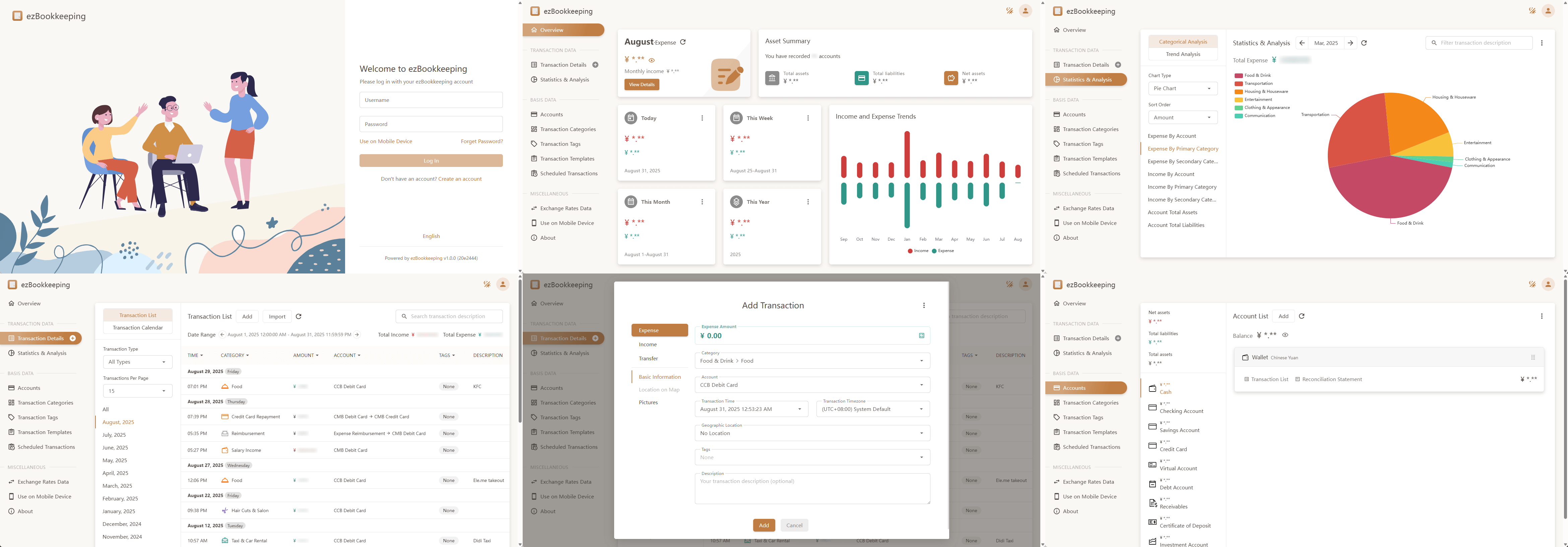
移动版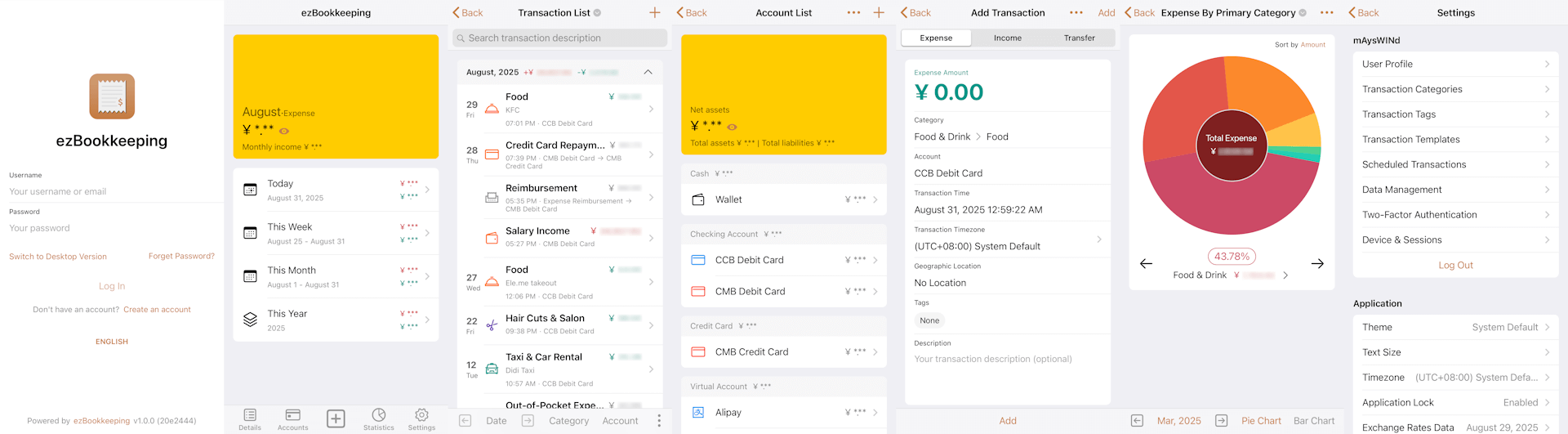
二、搭建
2.1 环境准备
| 安装软件 | 硬件配置 | 系统 |
|---|---|---|
| Docker、Docker Compose、Nginx | 2C4G | Debian GNU/Linux 12 |
注:2C4G只是我的pro环境而已,实际上占用很小
2.2 部署
创建安装目录
mkdir -p /data/docker_data/ezbookkeeping/
cd /data/docker_data/ezbookkeeping/编辑docker-compose.yaml
All options in the configuration file can be overridden using environment variables with the following name: EBK_{SECTIONNAME}{OPTION_NAME}.
配置文件中的所有选项,都可以通过 EBK{SECTIONNAME}{OPTIONNAME} 这种格式的环境变量来覆盖。
官方文档可能不全,可以参阅
- http://ezbookkeeping.mayswind.net/zh_Hans/installation
- https://github.com/mayswind/ezbookkeeping/blob/main/conf/ezbookkeeping.ini
# References:
# http://ezbookkeeping.mayswind.net/zh_Hans/installation
# http://ezbookkeeping.mayswind.net/demo/docker-compose.yml
# https://github.com/mayswind/ezbookkeeping/blob/main/conf/ezbookkeeping.ini

---
services:
  db:
    image: mariadb:11.4.2
    container_name: ezbookkeeping_db
    restart: unless-stopped
    environment:
      TZ: Asia/Shanghai
      MYSQL_ROOT_PASSWORD: e1cda100f04e8372314a # openssl rand -hex 10
      MYSQL_DATABASE: ezbookkeeping
      MYSQL_USER: ezbookkeeping
      MYSQL_PASSWORD: ezbookkeeping
    volumes:
      - ./db_data:/var/lib/mysql
      - ./db_log:/var/log/mysql
    healthcheck:
      test: ["CMD", "healthcheck.sh", "--connect", "--innodb_initialized"]
      interval: 10s
      timeout: 5s
      retries: 5
    networks:
      - ezbookkeeping

  ezbookkeeping:
    image: mayswind/ezbookkeeping:1.1.1
    container_name: ezbookkeeping
    hostname: ezbookkeeping
    restart: unless-stopped
    ports:
      - 8080:8080
    environment:
      TZ: Asia/Shanghai
      EBK_SERVER_DOMAIN: ezbookkeeping.example.com
      EBK_SERVER_ENABLE_GZIP: true
      EBK_MCP_ENABLE_MCP: true
      EBK_DATABASE_TYPE: mysql
      EBK_DATABASE_HOST: db:3306
      EBK_DATABASE_NAME: ezbookkeeping
      EBK_DATABASE_USER: ezbookkeeping
      EBK_DATABASE_PASSWD: ezbookkeeping
      EBK_LOG_MODE: file
      EBK_SECURITY_SECRET_KEY: its_should_be_a_random_string # openssl rand -hex 32
      EBK_USER_ENABLE_REGISTER: true # 设置为true允许用户自行注册账户, 部署完成后设置为false
    volumes:
      - ./ez_storage:/ezbookkeeping/storage
      - ./ez_log:/ezbookkeeping/log
    depends_on:
      db:
        condition: service_healthy
    networks:
      - ezbookkeeping

networks:
  ezbookkeeping:
driver: bridge设置EBK_USER_ENABLE_REGISTER: false的效果
编辑启动脚本
运行ezbookkeeping的 用户ID(UID)和 分组ID(GID)都是1000,所以需要保证挂载数据卷时,ezbookkeeping使用的目录有权限被 UID/GID1000读/写。
#!/bin/sh

set -eE

# ezbookkeeping
[ ! -d "$PWD/ez_storage" ] && mkdir "$PWD/ez_storage"
[ ! -d "$PWD/ez_log" ] && mkdir "$PWD/ez_log"
chown 1000:1000 "$PWD/ez_storage" "$PWD/ez_log"

docker compose up -d
chmod +x start.sh
./start.sh配置 nginx 反向代理
参阅:http://ezbookkeeping.mayswind.net/demo/ezbookkeeping.demo.conf
server {
    listen       80;
    listen       [::]:80;
    server_name   ezbookkeeping.example.com
    return 301    https://$host$request_uri;
}

server {
    listen       443 ssl;
    listen       [::]:443 ssl;
    listen       443 quic;
    listen       [::]:443 quic;
    server_name   ezbookkeeping.example.com;

    ssl_certificate      /etc/nginx/certs/example_cert.pem;
    ssl_certificate_key  /etc/nginx/certs/example_key.pem;

    resolver 1.1.1.1 8.8.8.8 223.5.5.5 valid=300s;
    resolver_timeout 5s;

    # 关闭缓存
    # proxy_cache off;
    # proxy_buffering off;

    client_max_body_size 5m;

    add_header Alt-Svc 'h3=":443"; ma=86400,h3-25=":443"; ma=86400,h3-29=":443"; ma=86400';

    location ~ ^/$|(mobile/|mobile$|desktop/|desktop$|avatar/|pictures/|qrcode/|mcp|api/|js/|css/|img/|fonts/|robots\.txt|favicon\.ico|favicon\.png|touchicon\.png|manifest\.json|sw\.js|server_settings\.js|workbox-[0-9a-zA-Z]+\.js) {
        proxy_pass         http://127.0.0.1:8080;
        proxy_redirect     off;
        proxy_http_version 1.1;
        proxy_set_header   Connection "upgrade";
        proxy_set_header   Upgrade $http_upgrade;
        proxy_set_header   Host $host;
        proxy_set_header   X-Real-IP $remote_addr;
        proxy_set_header   X-Forwarded-For $proxy_add_x_forwarded_for;
        proxy_set_header   X-Forwarded-Proto $scheme;
    }

    error_page 404 /404.html;
    location = /404.html {
        root /usr/local/openresty/nginx/html;
        internal;
    }
}


